By Guest Author: Jessica King
The Google Ad Grant is a transformative resource for nonprofits, offering $10,000 per month in search ad credits. But securing the grant is only the first step toward achieving greater fundraising results and mission visibility. To turn your ad credits into donations, volunteer registrations, or any other type of support, your website must be ready to convert the new traffic.
Otherwise, a poor website experience can cause users to click away, wasting the opportunity. Luckily, there’s a lot you can do to create a strong website that transforms interest into action.
Before applying for the Google Ad Grant, spend some time improving your website’s usability, making it easy to learn about your mission, and providing ways to get involved. Even if you already have the Google Ad Grant, it’s never too late to make adjustments to your site. From site security to strong content, let’s explore some nonprofit website best practices.
Establish Trust with Site Security.
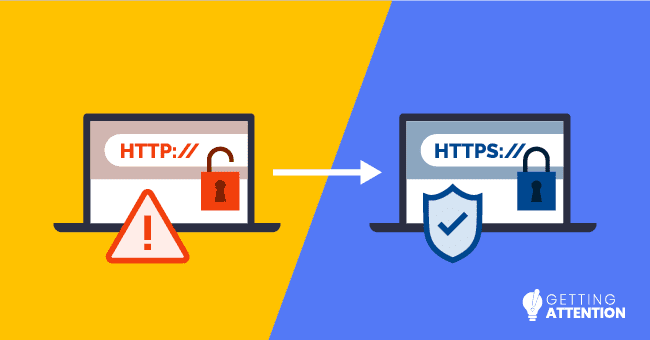
Website security is non-negotiable for both users and Google. Getting Attention’s guide to Google Ad Grant website requirements explains that nonprofit participants must have Secure Sockets Layer (SSL) certification. This encrypts data that’s transferred on your site.
Let’s say someone is donating or registering for your annual charity auction. They’ll likely share confidential information such as their:
- Full name
- Postal address
- Contact information
- Payment details
When your website has an SSL certificate, that information will be scrambled, so in the unlikely event that your website is hacked, unauthorized users won’t be able to see that data.
Luckily, installing an SSL certificate is usually free or low-cost. To verify whether you already have an SSL certificate, take a look at your website’s URL. If your web address begins with “https” instead of “http,” your site is protected. If your site is not secure, users may see a warning message before they access your page, which may cause them to leave.
Further, make sure any third-party tools you use have security features. For example, your donation tools should use a PCI-compliant payment processor. Visible security across your site will help visitors (including those who click your Google Ads) trust that any information they share will be protected.
Create Effective, Focused Landing Pages.
A landing page is the page a user “lands” on after clicking your ad. Think of your homepage as a busy lobby or information desk—it serves many purposes and points in multiple directions. In other words, it’s not an ideal page to promote with your Google Ads. A dedicated landing page, however, is like a private, quiet meeting room with content solely dedicated to the topic the visitor came for.
To create a great user experience, each landing page should directly relate to its corresponding ad’s message. If your ad promotes “after-school tutoring programs,” the landing page should be all about that specific program. Or, if you’re promoting a fundraiser or event, you’d send users to a dedicated campaign landing page.
Landing pages should also guide visitors towards making a conversion. As Nonprofits Source’s guide to Google Ad Grants explains, your landing pages should provide one clear call-to-action (CTA). Use straightforward language for your CTAs, whether it’s “Donate Now” or “Sign Up to Volunteer.”
Remember, the Ad Grant’s policies encourage substantial, unique content, not just thin pages made for ads. Build out each landing page with information about your mission and the purpose behind your work.
Ensure A Seamless Mobile Experience.
Many people use Google on their smartphones. If a potential supporter taps your ad on their phone, they shouldn’t have to pinch, zoom, and struggle to read your content. That creates a bad user experience that may drive them to leave your nonprofit’s website.
Ensure this doesn’t happen by improving your site’s mobile usability. To start, use responsive design, which makes content automatically adjust to fit any screen size. Many website builders offer this functionality, but being responsive is just the start. Here are a few ways to improve mobile usability further:
- Make buttons “thumb-friendly.” Ensure your main call-to-action buttons (like “Donate Now”) are large, clear, and have plenty of space around them so they are easy to tap.
- Focus on forms. Try filling out your donation form, volunteer sign-up page, or event registration form on a phone. Is it easy to navigate? Are there too many fields? Make adjustments to create a navigable form regardless of screen size.
- Test your text. Can you read all the text on your page without pinching and zooming? If mobile users have to zoom in, your font size is too small and not accessible.
- Avoid intrusive pop-ups. While pop-ups can encourage action, one that covers the entire mobile screen is frustrating. Avoid pop-ups if possible. Otherwise, ensure any pop-ups are small and easy to close.
Don’t let a clunky mobile site waste your ad budget. A seamless experience respects your visitor’s time and makes it easy for them to take action. A site that works well on a phone is a site that’s ready to turn ad traffic into real-world impact!
Quicken Your Nonprofit Website’s Load Time.
User expectations for speed are high, and data shows that as load time increases, the probability of a user leaving your site increases dramatically. In fact, for every 1,000 visitors a website receives:
- 70 will leave without visiting another page if it loads in one second.
- 110 will leave if it loads in three seconds.
- 380 will leave if it takes five seconds to load.
Essentially, a slow-loading landing page is poison to an ad campaign. Site speed is a direct component of your Google Ads Quality Score, and a lower score means your ads will be shown less frequently and in lower positions.
Here are some easy ways to speed up your site:
- Optimize your images. Before uploading any photos, run them through a free online compression tool to reduce their file size without losing quality. You can also convert them to other formats that are better for speed, like WebP or AVIF.
- Review your plugins and scripts. If your site runs on a platform like WordPress, it’s easy to accumulate many plugins. Audit your plugins and deactivate or delete any you are not actively using, as each one can add to your site’s load time.
- Enable browser caching. Ask your web developer or hosting provider to turn on caching. This allows repeat visitors to load your site faster by remembering parts of it, so it doesn’t have to reload everything every time.
While some of these tips may require a chat with your web developer, the payoff for your ad grant is enormous. A faster site creates a more professional and trustworthy experience, making the decision to support your cause a no-brainer.
Final Thoughts
The Google Ad Grant is a powerful tool for driving traffic, but your website does the hard work of converting that traffic into supporters. By securing your site and creating a helpful and enjoyable user experience, you create a foundation for success.
While website preparation is the first step, partnering with a Google Ad Grants agency can help you take full advantage of that foundation by managing the day-to-day keyword strategy, ad creation, and compliance. Your agency might even offer tailored website recommendations to improve your ad performance!
Ultimately, your preparation will create a better, more accessible, and more trustworthy experience for anyone who clicks your ads, helping you further your mission’s visibility.