We asked staff at social service organizations, from frontline caseworkers to executive directors, what they need most from their client records and reporting. This report shares their answers and what they mean for a team planning a change.
want reports they can trust without fixing them in spreadsheets
22%
say changing forms as requirements change matters most
53%
of frontline staff want a client’s history at a glance
Which improvements staff prioritize
From a list of 13, respondents chose the three improvements that would make the biggest difference, then the one that would matter most. Four came out on top.
43%
put trustworthy reports, without fixing data in spreadsheets, in their top three
47% of leaders and managers
46% of data and reporting staff
29% of frontline and intake staff
Funder report, Q3
Housing support212
Family resource156
Employment94
Youth mentoring87
Clients served549
Totals match the client records
33%
want to adapt forms as programs or funder requirements change
Intake form, editing
Program
Housing status new, required by funder
31%
want to see a client’s situation, history and next steps quickly
JE
Jordan EllisReturning client
IntakeMarch 4
Housing referralMarch 11
Case noteApril 2
31%
want to find the right client or record faster
Search: Jordan Ell
JEJordan Ellis, b. 199112 visits since 2024
JEJordan Elis, b. 1991Possible duplicate
22%
picked adapting forms as requirements change as the single most valuable improvement, more than any other
“Our funder requirements change yearly, so being able to change fields would be extremely helpful.”
See all 13 improvements
All 13 improvements: top-three choices and single most valuable
Respondents chose three improvements, then the one that would create the most value
Chosen in top three
Chosen as the single most valuable
Trustworthy reports without fixing data in spreadsheets43%14%
Adapt forms and fields as programs or funder requirements change33%22%
Quickly understand a client’s situation, history and next steps31%6%
Find the right client, record or information faster31%6%
Complete everyday client work in fewer steps29%14%
A faster, more reliable system24%12%
Intake, programs, groups and attendance in one connected workflow22%10%
Keep data accurate; manage duplicates and inactive records18%0%
Complete common actions for many clients at once16%6%
Automate follow-ups, assignments and reminders12%8%
Managers can monitor caseloads, staff activity and outcomes12%4%
Learn tasks without help from a more experienced user12%0%
Work from a phone, tablet or remote location10%0%
Show as a table
Outcome (full wording)
Top three
Most valuable
We can produce trustworthy reports without combining or correcting data in spreadsheets
43%
14%
Our organization can adapt forms and fields as programs or funder requirements change
33%
22%
Staff can quickly understand a client’s current situation, history, and next steps
31%
6%
Staff can find the right client, record, or information more quickly
31%
6%
Frontline staff can complete everyday client and service work with fewer steps
29%
14%
The system is faster and more reliable during everyday work
24%
12%
We can manage intake, registration, programs, groups, sessions, or attendance in one connected workflow
22%
10%
We can keep client and program data accurate and manage duplicates or inactive records safely
18%
0%
We can complete common actions for multiple clients or participants at once
16%
6%
We can automate repeatable follow-ups, assignments, reminders, or next steps
12%
8%
Managers can monitor caseloads, staff activity, programs, and outcomes more effectively
12%
4%
Users can learn how to complete tasks without needing help from a more experienced user
12%
0%
Staff can work effectively from a phone, tablet, or remote location, including with limited connectivity
10%
0%
Source: Social Services Insight Survey 2026, Societ.
As an administrator, I was tempted to go with reliable reports, but since our work is all about serving clients, being able to access client data as quickly, easily, and reliably as possible is really the most important thing for us.
81%save staff time
What staff expect a change to deliver
Asked what a meaningful improvement in their top-priority area would change; respondents could choose several
More staff could use the system effectively60%
Staff would spend more time serving clients53%
Better reporting to funders, leadership or the board49%
Replace another tool, spreadsheet or manual process49%
Fewer errors, compliance concerns or data risk42%
More consistent, higher-quality service delivery37%
Stronger grant applications and planning26%
How priorities differ across your team
Each group put something different first, so ask frontline staff, managers and data staff separately before your team agrees on what to change.
JE
Jordan EllisReturning client
IntakeMarch 4
Housing referralMarch 11
Case noteApril 2
Frontline and intake staffMost often chose quickly understanding a client’s situation, history and next steps (53%).
Board report
Clients served
Sessions
Goals met
Matches the funder report
Leaders and managersMost often chose trustworthy reports without fixing data in spreadsheets (47%).
Search: Jordan Ell
JEJordan Ellis, b. 199112 visits since 2024
JEJordan Elis, b. 1991Possible duplicate
Data and reporting staffMost often chose finding the right client or record faster (54%).
Top-three outcomes by role
Share of each group choosing the outcome in their top three
Select a group to highlight its answers and sort the outcomes by them.
0%20%40%60%
Trustworthy reports without fixing data in spreadsheets
Quickly understand a client’s situation, history and next steps
Find the right client, record or information faster
Complete everyday client work in fewer steps
Adapt forms and fields as programs or funder requirements change
Intake, programs, groups and attendance in one connected workflow
A faster, more reliable system
Complete common actions for many clients at once
Show as a table
Outcome
Frontline and intake staff
Leaders and managers
Data and reporting staff
Trustworthy reports without fixing data in spreadsheets
29%
47%
46%
Quickly understand a client’s situation, history and next steps
53%
20%
23%
Find the right client, record or information faster
35%
20%
54%
Complete everyday client work in fewer steps
41%
33%
23%
Adapt forms and fields as programs or funder requirements change
18%
33%
38%
Intake, programs, groups and attendance in one connected workflow
24%
40%
8%
A faster, more reliable system
18%
13%
38%
Complete common actions for many clients at once
29%
20%
0%
Read differences between role groups as directional. Source: Social Services Insight Survey 2026, Societ.
Everyday work
The system is part of most people’s whole day: 64% use it constantly and 78% at least once a day, so a change to it reaches almost everyone’s routine.
Keeping records accurate is part of the job for 64% of respondents, including 53% of frontline and intake staff.
See all nine tasks
Everyday tasks in the system
Share of respondents who do each task in their case management system; respondents could choose several
Write case notes, plans and assessments76%
Review client information or service history72%
Complete intake or create client records71%
Maintain data quality or correct records64%
Prepare reports for leadership, boards or funders52%
Configure forms, fields, workflows or permissions38%
Manage referrals, follow-ups or staff assignments34%
Manage programs, groups, sessions or attendance28%
Monitor programs, caseloads or performance26%
Source: Social Services Insight Survey 2026, Societ.
An illustrative dayShare of respondents who do each task
9:00Intake for a new client71%
10:30Case notes from a home visit76%
1:00Review a client’s history before a meeting72%
3:00Fix duplicate and outdated records64%
4:30Monthly report for a funder52%
We need good reliable data to get grants, and we need grants to keep our services free and accessible.
Planning a system change
These five steps come from the findings above. They apply whether you are choosing a new system, rebuilding the one you have or responding to new funder requirements, and each is easier to settle before the change starts.
Frontline staff, managers and data staff each put a different improvement first.
Collect each group’s priorities before choosing what to change.
Agree on what success will mean
81% expect an improvement to save staff time.
Note how long the slow tasks take now, so you can tell afterward whether the change gave that time back.
Take stock of your data and side tools
64% maintain or correct records as part of their job.
List the spreadsheets the change should retire, and clean up records before any data moves.
Plan for requirements to keep changing
Adapting forms was the most common pick for the single most valuable improvement (22%).
Ask how a form, field or report gets changed after launch, and who on your team can do it.
Train every role that will use it
60% expect an improvement would let more staff use the system effectively.
Plan training for occasional users and new hires as well as daily users, and decide who answers questions after launch.
Questions to ask your team first
The first step starts with a conversation. These questions turn the survey’s top priorities into one for a staff or leadership meeting. Ask each group separately, then compare answers.
Reporting
43% put trustworthy reports, without fixing data in spreadsheets, in their top three.
Which reports does your team still finish by combining or correcting data in spreadsheets?
How many hours does that take each month, and who does it?
Changing requirements
22% named adapting forms and fields as programs or funder requirements change as the single most valuable improvement.
When a funder or program last changed what you collect or report, what did your team have to update?
How long did it take before your records matched the new requirement?
Client history
53% of frontline and intake staff put quickly understanding a client’s situation, history and next steps in their top three.
When a returning client comes in, how quickly can a staff member see their history and next steps?
Where do staff look when the record is incomplete?
Connected programs
40% of leaders and managers put running intake, programs and attendance in one connected workflow in their top three.
Where does information stop flowing between intake, programs and attendance?
Which details does someone enter more than once?
81% expect an improvement in their top-priority area to save staff time. If your team got that time back, where would it go?
Two pages: the five steps and these questions, with room for notes
About the survey
Societ ran this survey online from September 15 to 30, 2026. Respondents were recruited from Societ’s customer community and received a gift card for taking part. All work at social service organizations, most of them in the United States and Canada, and all use a case management system in their work.
The largest groups were database administrators (22%), executive directors or senior leaders (21%), intake and program coordinators (17%) and frontline caseworkers and counselors (16%). A third work in community and social services.
Not every respondent answered every question, so each percentage is based on the people who answered that question. Percentages are rounded to the nearest whole number, and where respondents could choose several answers they add up to more than 100%. Where an answer option named the respondent’s software, we replaced the product name with “the system.” Treat differences between role groups as directional. Quotes are attributed by role and type of organization only. Photographs on this page are illustrative and do not show survey respondents.
Respondents by role and type of organization
Share of respondents by role group (each square is 1%) and by type of organization
Frontline and intake staff33%Caseworkers, counselors, intake and program coordinators
Leaders and managers29%Executive directors, senior leaders, case and program managers
Data and reporting staff26%Database administrators, reporting and evaluation staff
Other roles12%Fundraisers, operations and other roles
Type of organization
Community and social services34%
Mental health and counseling14%
Education, training and employment12%
Disability services12%
Housing and homelessness7%
Violence prevention and victim support7%
Other fields14%
Source: Social Services Insight Survey 2026, Societ.
Request a Sumac demo
Sumac is the case management system Societ builds for social service organizations in the United States and Canada. Tell us about your programs, and we’ll arrange a demo that covers what this survey ranked highest: reporting, changing forms and a client’s full history.
Every new Sumac case management customer starts with an implementation: our team sets up the database, imports your historical data and configures Sumac for your programs.
Societ makes software for nonprofits, including Sumac. We run this survey each year to learn what teams need from their client data.
Research report, October 2026
Social Services Insight Survey 2026
We asked staff at social service organizations, from frontline caseworkers to executive directors, what they need most from their client records and reporting. This report shares their answers and what they mean for a team planning a change.
From Societ, the team that builds Sumac case management
At a glance
81%expect an improvement to save staff time
43%want reports they can trust without fixing them in spreadsheets
22%say changing forms as requirements change matters most
53%of frontline staff want a client’s history at a glance
Findings
Which improvements staff prioritize
From a list of 13, respondents chose the three improvements that would make the biggest difference, then the one that would matter most. Four came out on top.
43%
put trustworthy reports, without fixing data in spreadsheets, in their top three
47% of leaders and managers
46% of data and reporting staff
29% of frontline and intake staff
Funder report, Q3
Housing support212
Family resource156
Employment94
Youth mentoring87
Clients served549
Totals match the client records
33%
want to adapt forms as programs or funder requirements change
Intake form, editing
Program
Housing status new, required by funder
31%
want to see a client’s situation, history and next steps quickly
JE
Jordan EllisReturning client
IntakeMarch 4
Housing referralMarch 11
31%
want to find the right client or record faster
Search: Jordan Ell
JEJordan Ellis, b. 199112 visits since 2024
JEJordan Elis, b. 1991Possible duplicate
22%
picked adapting forms as requirements change as the single most valuable improvement, more than any other
“Our funder requirements change yearly, so being able to change fields would be extremely helpful.”
Findings
Every improvement on the list
All 13 improvements: top-three choices and single most valuable
Respondents chose three improvements, then the one that would create the most value
Chosen in top three
Chosen as the single most valuable
Trustworthy reports without fixing data in spreadsheets43%14%
Adapt forms and fields as programs or funder requirements change33%22%
Quickly understand a client’s situation, history and next steps31%6%
Find the right client, record or information faster31%6%
Complete everyday client work in fewer steps29%14%
A faster, more reliable system24%12%
Intake, programs, groups and attendance in one connected workflow22%10%
Keep data accurate; manage duplicates and inactive records18%0%
Complete common actions for many clients at once16%6%
Automate follow-ups, assignments and reminders12%8%
Managers can monitor caseloads, staff activity and outcomes12%4%
Learn tasks without help from a more experienced user12%0%
Work from a phone, tablet or remote location10%0%
Source: Social Services Insight Survey 2026, Societ.
81%save staff time
What staff expect a change to deliver
Asked what a meaningful improvement in their top-priority area would change; respondents could choose several
More staff could use the system effectively60%
Staff would spend more time serving clients53%
Better reporting to funders, leadership or the board49%
Replace another tool, spreadsheet or manual process49%
Fewer errors, compliance concerns or data risk42%
More consistent, higher-quality service delivery37%
Stronger grant applications and planning26%
Your team
How priorities differ across your team
Each group put something different first, so ask frontline staff, managers and data staff separately before your team agrees on what to change.
Frontline and intake staffMost often chose quickly understanding a client’s situation, history and next steps (53%).
Leaders and managersMost often chose trustworthy reports without fixing data in spreadsheets (47%).
Data and reporting staffMost often chose finding the right client or record faster (54%).
Top-three outcomes by role
Share of each group choosing the outcome in their top three
Frontline and intake staff
Leaders and managers
Data and reporting staff
0%20%40%60%
Trustworthy reports without fixing data in spreadsheets
Quickly understand a client’s situation, history and next steps
Find the right client, record or information faster
Complete everyday client work in fewer steps
Adapt forms and fields as programs or funder requirements change
Intake, programs, groups and attendance in one connected workflow
A faster, more reliable system
Complete common actions for many clients at once
Read differences between role groups as directional. Source: Social Services Insight Survey 2026, Societ.
Everyday work
The system is part of most people’s whole day
64% use it constantly and 78% at least once a day, so a change to it reaches almost everyone’s routine. Keeping records accurate is part of the job for 64% of respondents, including 53% of frontline and intake staff.
An illustrative dayShare of respondents who do each task
9:00Intake for a new client71%
10:30Case notes from a home visit76%
1:00Review a client’s history before a meeting72%
3:00Fix duplicate and outdated records64%
4:30Monthly report for a funder52%
Everyday tasks in the system
Share of respondents who do each task in their case management system; respondents could choose several
Write case notes, plans and assessments76%
Review client information or service history72%
Complete intake or create client records71%
Maintain data quality or correct records64%
Prepare reports for leadership, boards or funders52%
Configure forms, fields, workflows or permissions38%
Manage referrals, follow-ups or staff assignments34%
Manage programs, groups, sessions or attendance28%
Monitor programs, caseloads or performance26%
Source: Social Services Insight Survey 2026, Societ.
We need good reliable data to get grants, and we need grants to keep our services free and accessible.
Planning a change
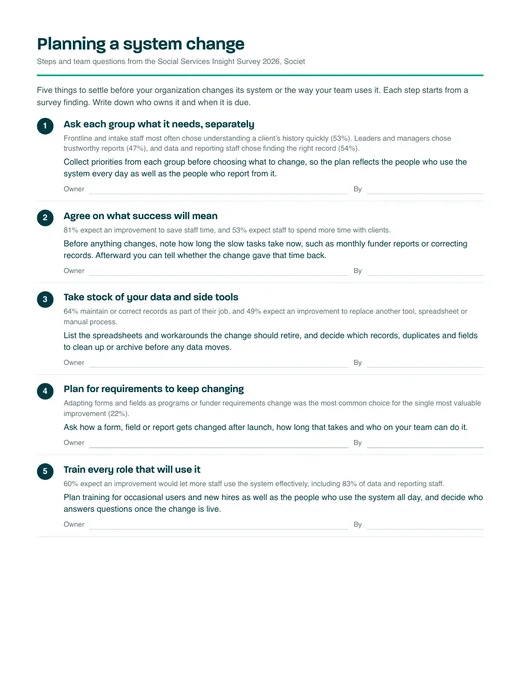
Five steps for planning a system change
These steps come from the findings. They apply whether you are choosing a new system, rebuilding the one you have or responding to new funder requirements, and each is easier to settle before the change starts.
Ask each group what it needs, separately
Frontline and intake staff most often chose understanding a client’s history quickly (53%). Leaders and managers chose trustworthy reports (47%), and data and reporting staff chose finding the right record (54%).
Collect priorities from each group before choosing what to change, so the plan reflects the people who use the system every day as well as the people who report from it.
Owner By
Agree on what success will mean
81% expect an improvement to save staff time, and 53% expect staff to spend more time with clients.
Before anything changes, note how long the slow tasks take now, such as monthly funder reports or correcting records. Afterward you can tell whether the change gave that time back.
Owner By
Take stock of your data and side tools
64% maintain or correct records as part of their job, and 49% expect an improvement to replace another tool, spreadsheet or manual process.
List the spreadsheets and workarounds the change should retire, and decide which records, duplicates and fields to clean up or archive before any data moves.
Owner By
Plan for requirements to keep changing
Adapting forms and fields as programs or funder requirements change was the most common choice for the single most valuable improvement (22%).
Ask how a form, field or report gets changed after launch, how long that takes and who on your team can do it.
Owner By
Train every role that will use it
60% expect an improvement would let more staff use the system effectively, including 83% of data and reporting staff.
Plan training for occasional users and new hires as well as the people who use the system all day, and decide who answers questions once the change is live.
Owner By
Planning a change
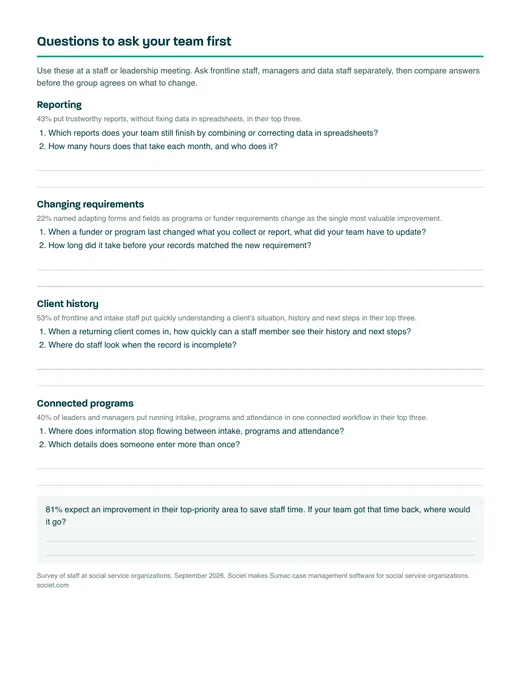
Questions to ask your team first
Use these at a staff or leadership meeting. Ask frontline staff, managers and data staff separately, then compare answers before the group agrees on what to change.
Reporting
43% put trustworthy reports, without fixing data in spreadsheets, in their top three.
Which reports does your team still finish by combining or correcting data in spreadsheets?
How many hours does that take each month, and who does it?
Changing requirements
22% named adapting forms and fields as programs or funder requirements change as the single most valuable improvement.
When a funder or program last changed what you collect or report, what did your team have to update?
How long did it take before your records matched the new requirement?
Client history
53% of frontline and intake staff put quickly understanding a client’s situation, history and next steps in their top three.
When a returning client comes in, how quickly can a staff member see their history and next steps?
Where do staff look when the record is incomplete?
Connected programs
40% of leaders and managers put running intake, programs and attendance in one connected workflow in their top three.
Where does information stop flowing between intake, programs and attendance?
Which details does someone enter more than once?
81% expect an improvement in their top-priority area to save staff time. If your team got that time back, where would it go?
As an administrator, I was tempted to go with reliable reports, but since our work is all about serving clients, being able to access client data as quickly, easily, and reliably as possible is really the most important thing for us.
Worksheet
Before you change anything
Fill this in with your team. The first table records how long the slow work takes today, so you can check later whether a change gave that time back. In the second, each group scores your current system on the improvements staff ranked highest.
1. Time spent today
Task
Who does it
Hours a month now
Target after the change
Monthly funder, board or leadership reports52% prepare these reports
Fixing report data in spreadsheets43% want reports they can trust without this step
Correcting duplicate and outdated records64% maintain or correct records
Updating forms for a new funder requirement38% configure forms, fields or workflows
Reviewing a client’s history before a meeting72% review client history
Other:
2. Rate your current system
Have each group score every row on its own, from 1 (a daily struggle) to 5 (works well). Rows near the top of the list that score low are the place to start.
Improvement
Staff top three
Frontline
Managers
Data staff
Trustworthy reports without fixing data in spreadsheets
43%
Adapt forms and fields as programs or funder requirements change
33%
Quickly understand a client’s situation, history and next steps
31%
Find the right client, record or information faster
31%
Complete everyday client work in fewer steps
29%
Survey figures are the share of respondents. Source: Social Services Insight Survey 2026, Societ.
Method
About the survey
Societ ran this survey online from September 15 to 30, 2026. Respondents were recruited from Societ’s customer community and received a gift card for taking part. All work at social service organizations, most of them in the United States and Canada, and all use a case management system in their work.
The largest groups were database administrators (22%), executive directors or senior leaders (21%), intake and program coordinators (17%) and frontline caseworkers and counselors (16%). A third work in community and social services.
Not every respondent answered every question, so each percentage is based on the people who answered that question. Percentages are rounded to the nearest whole number, and where respondents could choose several answers they add up to more than 100%. Where an answer option named the respondent’s software, we replaced the product name with “the system.” Treat differences between role groups as directional. Quotes are attributed by role and type of organization only. Photographs in this report are illustrative and do not show survey respondents.
Respondents by role and type of organization
Share of respondents by role group (each square is 1%) and by type of organization
Frontline and intake staff33%Caseworkers, counselors, intake and program coordinators
Leaders and managers29%Executive directors, senior leaders, case and program managers
Data and reporting staff26%Database administrators, reporting and evaluation staff
Other roles12%Fundraisers, operations and other roles
Type of organization
Community and social services34%
Mental health and counseling14%
Education, training and employment12%
Disability services12%
Housing and homelessness7%
Violence prevention and victim support7%
Other fields14%
Source: Social Services Insight Survey 2026, Societ.
See Sumac in a 30‑minute demo
Sumac is the case management system Societ builds for social service organizations in the United States and Canada. We’ll show you what this survey ranked highest: reporting you can trust, forms that change with your requirements and a client’s full history in one place.
Every new Sumac case management customer starts with an implementation: our team sets up the database, imports your historical data and configures Sumac for your programs.
Request a demo at societ.com/get-a-demo
Funder report, Q3
Housing support212
Family resource156
Employment94
Youth mentoring87
Clients served549
Totals match the client records
Societ makes software for nonprofits, including Sumac. We run this survey each year to learn what teams need from their client data.